
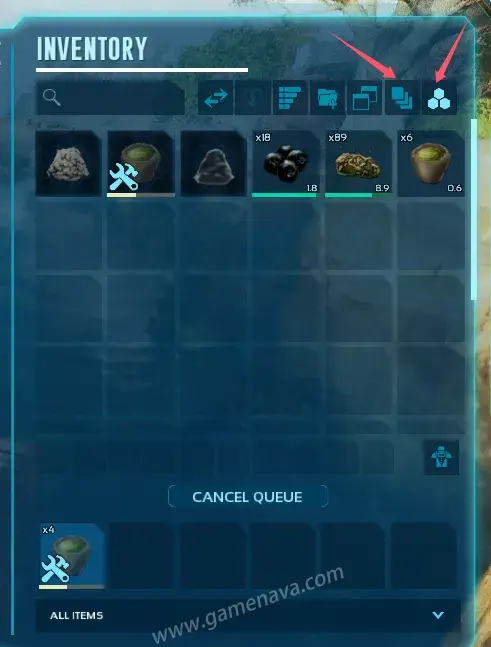
In ARK: Survival Ascended, the Mortar and Pestle is one of the essential crafting tools used to make basic items such as NARCOTIC and Cementing Paste. Sometimes players notice that NARCOTIC or other craftable items don’t appear in the Mortar and Pestle menu. This usually happens because of incorrect filter settings. The correct setup is shown in the image below.
1. Steps to Use the Mortar and Pestle:
- Face the Mortar and Pestle and press E to open its inventory.
- Adjust the filters as shown in the image to ensure all craftable items are visible.
- Drag the required materials (like NARCOBERRY and SPOILED MEAT) into the Mortar and Pestle.
- Right-click on the desired item (e.g., NARCOTIC) and choose the quantity to begin crafting.
2. Crafting Tips:
If you queue too many items and wish to stop mid-process, click CANCEL QUEUE to cancel the remaining crafting tasks.
Note: The item currently being crafted will continue since the materials have already been consumed.
3. NARCOTIC Recipe:
To craft NARCOTIC, you’ll need:
• 5 × NARCOBERRY
• 1 × SPOILED MEAT
Once placed into the Mortar and Pestle, follow the steps above to produce NARCOTIC for taming creatures or making tranquilizer arrows.