
In ARK: Survival Ascended, newly created characters often die seemingly for no reason, even when you feel like you haven’t done anything wrong. In most cases, this is not a bug. It happens because one or more vital status indicators are steadily dropping.
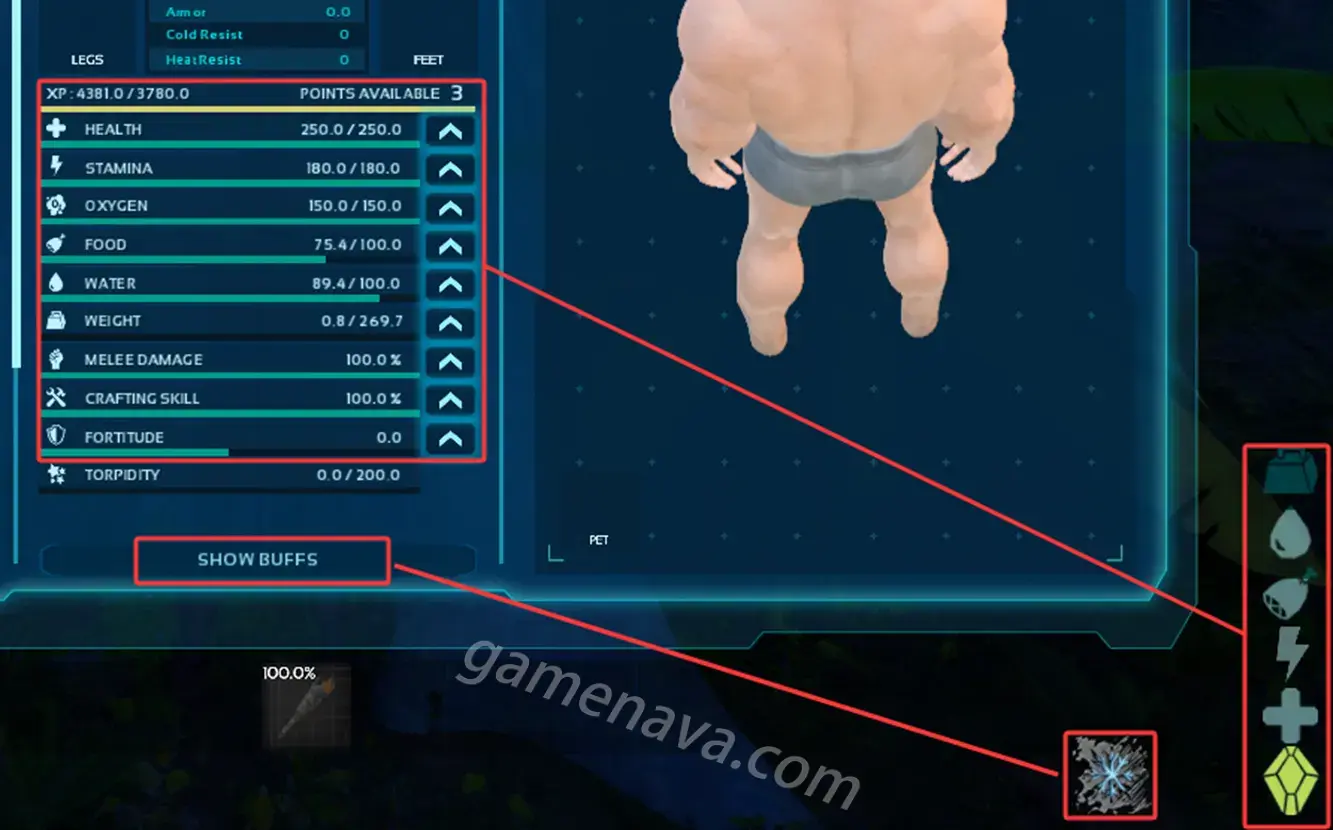
You should always pay attention to the status icons in the bottom right corner of the screen. When your character is affected by hunger, thirst, cold, or heat, your health will slowly drain. If these conditions are ignored, death is inevitable.
Understanding what these icons mean is especially important for new players.
To check the meaning of each icon, press the I key to open the character interface (B on Xbox, Circle on PlayStation). On this screen, you can see all of your character’s attributes. The icons shown above these attributes correspond directly to the icons displayed in the bottom right corner.
Status effects such as cold and heat are classified as buffs or debuffs. You need to click “SHOW BUFFS” to view their detailed descriptions and effects.
The IMPLANT icon represents your experience (XP) status and is related to character progression and leveling.
See the image below for a visual reference of each icon and its meaning.